Invoice automation - From invoice checks to human approval
Extract values from invoice PDFs received by email, check them against purchase-order records and route them for human approval. AI reads the values, rules check readiness and a person makes the decision.
Published on Microsoft Tech Community
The manual work
Every invoice needs a purchase-order check, a total comparison and a duplicate check.
What changes
Flag exceptions and request human approval only for invoices that pass validation.
How the work flows.
- 01
Extract invoice details
Read the invoice number, purchase-order reference and total from an emailed PDF.
- 02
Check the order and duplicates
Compare the extracted values with the registered order and expected total, and check whether the invoice is already registered.
- 03
Separate exceptions
Record total mismatches, missing purchase orders and duplicates with a reason. Request approval only after validation passes.
- 04
Record the decision
Record the reviewer’s approval or rejection on the same invoice entry so its status stays visible.
Implementation and evidence
A hands-on lab published on Microsoft Tech Community. Synthetic PDFs were used to verify approved, rejected, total-mismatch, missing-purchase-order and duplicate outcomes.
The lab covers one currency and one invoice per PDF. It records review decisions; it does not post accounting entries or release payments. Production use requires additional failure recovery and approval-expiry handling.
Tools used: Outlook, Power Automate, AI Builder, SharePoint, Approvals
Read the Microsoft Tech Community guide (opens in a new tab)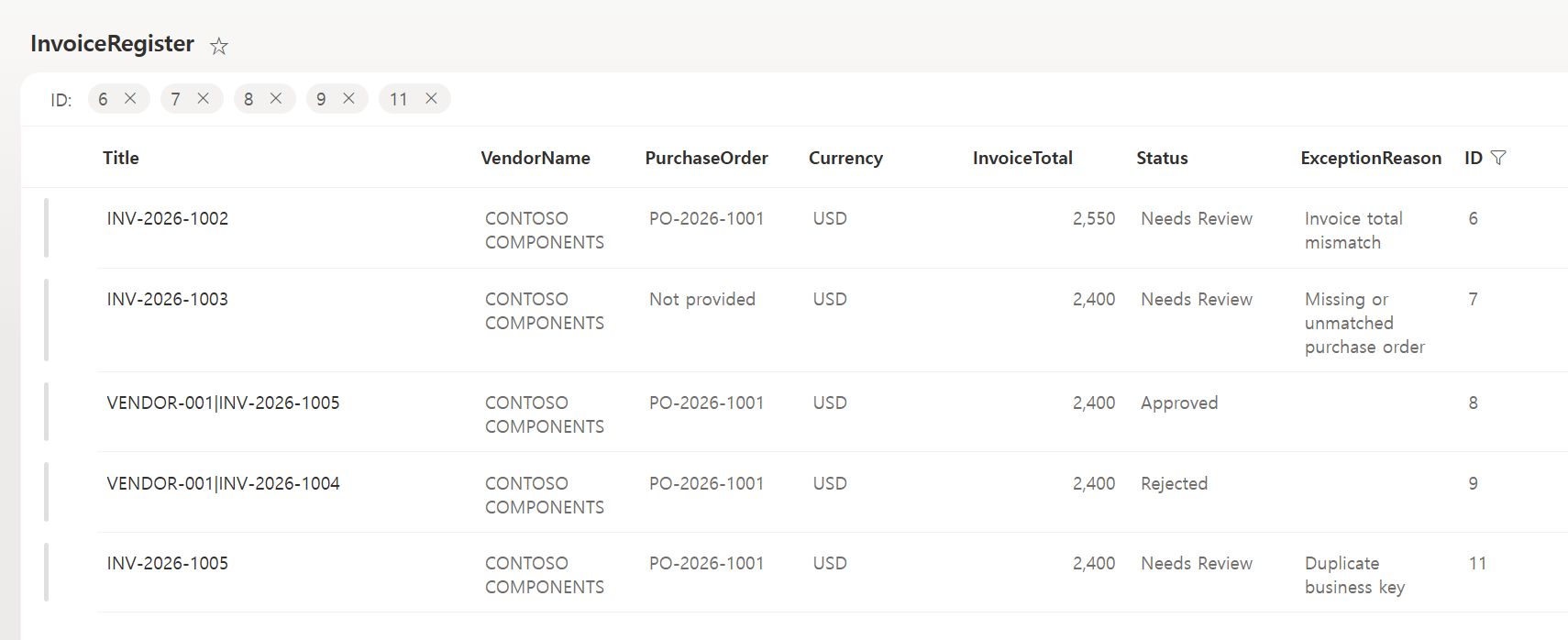
Does this sound like your work?
Tell us how the work happens today. We’ll identify what can be automated and a practical place to start.
Book a 30-minute callNo preparation needed.