What to check before automating a shared mailbox workflow
by Minseok Song, founder of Reliable Workflow / 8-minute guide
A practical way to decide whether an email workflow is suitable for automation, what a first pilot should include, and where human review should remain.
A shared mailbox is often where work begins, but not where the team can easily see its status. Requests arrive, someone reads them, decides who should handle them, copies information elsewhere, and prepares a response.
When the rules live mostly in people’s heads, adding AI does not solve the underlying problem. It can simply make an unclear process move faster. Before choosing a model or building a flow, answer these seven questions.
In brief
- 01
- Automate a repeatable decision and handoff, not an entire mailbox at once.
- 02
- Keep ambiguous, sensitive and final customer-facing decisions with a named person.
- 03
- Define the pilot boundary, licensing assumptions and operating owner before the build starts.
Fit assessment
Is this workflow a good candidate?
The right starting point depends on how repeatable the work is and how clearly the team can explain a correct outcome.
Good fit
The normal path repeats
- Observed condition
- Similar requests arrive, routing rules can be explained, and people re-enter the same information or chase the current status.
- Recommended starting point
- Pilot one frequent request type with an agreed routing catalogue.
- Human responsibility
- Review exceptions and approve the final reply.
Partial fit
The preparation is stable
- Observed condition
- Intake, recording and draft preparation can be automated while exceptions, unclear ownership and final replies stay with people.
- Recommended starting point
- Start with intake, recording and editable draft preparation.
- Human responsibility
- Resolve unclear ownership and approve customer-facing content.
Pause first
The outcome is not agreed
- Observed condition
- Every request is materially different, ownership is unresolved, or the volume is too low to justify maintaining an automation.
- Recommended starting point
- Clarify ownership and the normal process before selecting tools.
- Human responsibility
- Agree the operating decision and escalation path.
Operating principle
Set the operating boundary before the technology
A useful design states what the workflow may prepare and what a named person must still decide.
The workflow can prepare
- 01Structured data from an incoming message
- 02A recommended team based on an agreed catalogue
- 03A case record and visible processing status
- 04An editable response draft
People remain responsible for
- 01Missing or conflicting context
- 02Sensitive and high-impact requests
- 03Exceptions and changes to the operating rules
- 04The final customer-facing decision and response
Diagnostic questions
Seven questions to answer before the build
These questions turn a general interest in automation into a scope that can be tested and handed over.
What actually arrives in the mailbox?
Start with real categories, not a proposed AI taxonomy. Review a representative sample and identify request types, monthly volume, common attachments, languages and peaks in demand.
The goal is not to classify every possible message. Find one repeatable request type with enough examples to test. If the team cannot describe its normal path, the first task is process clarification rather than automation.
Who decides what happens next?
Write down who reads the message, chooses the responsible team, prepares the reply and is allowed to send it.
A flow can recommend a route, create a case record or prepare a draft. It should not silently replace an ownership decision the business has never made. Where two teams disagree, define the escalation path first.
Which rules are stable enough to automate?
Separate explicit rules from individual judgment. “Existing invoice requests go to Accounts Payable” can be tested. “Send it to whoever knows this customer” cannot be automated as written.
Useful inputs may include request type, product, region, customer status, urgency and required approval. Record the allowed values and what happens when information is missing or conflicting.
Where must a person remain responsible?
Human review is not a temporary weakness in the design. It is part of the control model. A named person should normally remain responsible for ambiguous routing, sensitive or high-impact messages, exceptions and final customer-facing content.
For an initial pilot, keep replies as editable Outlook drafts rather than sending them automatically. The workflow can reduce preparation and coordination; the team still owns the service decision.
Where will status and evidence be recorded?
An inbox alone is a poor operating record. Decide where each request, recommendation, decision, exception and final status will be stored.
In a Microsoft 365 environment, a SharePoint list can be a simple starting point. The team should be able to see what happened without reconstructing it from email threads, including failed and waiting cases rather than only completed ones.
What Microsoft environment and permissions already exist?
Check the environment before estimating implementation cost. Existing Microsoft 365 rights may cover part of the workflow, but the answer depends on the tenant, policies and proposed design.
- Exchange Online and access to the relevant shared mailbox
- SharePoint or another approved system of record
- Power Automate licenses and permissions for the people who will own the flow
- Data-loss prevention, retention and security requirements
- Whether AI services, Azure components, premium connectors or custom connectors are permitted
What will the pilot prove?
A pilot should answer a limited business question, not attempt to automate the whole mailbox. Automatic sending, every historical exception and a full production rollout do not need to be in the first scope.
- One request type and one agreed routing catalogue
- A working normal path plus representative missing-data and exception cases
- Editable reply drafts with human approval
- A test record comparing expected and observed results
- A recommendation for production scope, ownership and remaining risks
Cost and readiness
What affects the implementation cost?
The main factors are the number of systems involved, clarity of the routing rules, variety of exceptions, message volume, security requirements and the evidence needed before launch.
AI services, premium connectors, Azure resources, additional capacity or a different licensing arrangement can add cost. A bounded work package with agreed inputs, test cases, outputs and success criteria makes those assumptions visible. Production deployment, monitoring, support and later expansion can then be scoped from what the pilot reveals.
What to bring to a first conversation
You do not need a requirements document or a chosen technology. These five details are enough to assess a practical starting point.
- 01The current email process
- 02An approximate monthly volume
- 03An anonymized sample, if available
- 04The most common delay or handoff problem
- 05The person who owns the final decision
Technical lab
See what the automation handles and where people review
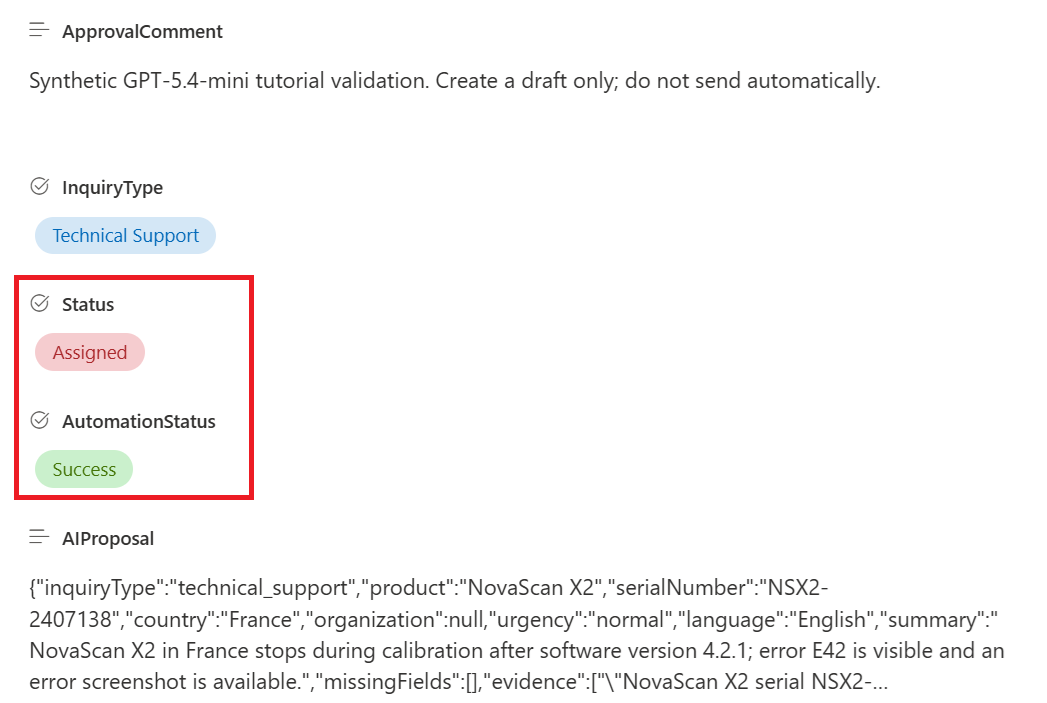
This support-email workflow uses Power Automate, Microsoft Foundry, SharePoint and Outlook. It classifies an incoming message, validates the recommended team, records the case and prepares an editable reply draft.
Evidence boundary
This is a technical lab using synthetic data, not a customer result. It demonstrates the implementation pattern and the points where human approval remains.
- Evidence type
- Technical validation with synthetic data
- Demonstrated in the lab
- The lab connects classification and team validation to an agreed routing catalogue.
- It records case details and automation status in SharePoint.
- It prepares an editable Outlook draft for human review.
- Not demonstrated
- Customer time savings, cost savings, live-mailbox accuracy and production operating outcomes.